⚽ Too bad, Germany is out. 30% consolation discount on your annual plan. Sign up now →

Logo Handwerkersoftware plancraft
Features
Office
Icon von einem Dokument, welches für die Funktion Auftragsdokumente steht
Project documents

Offers, order confirmations, delivery notes and invoices.

Icon von einem Laptop, welches für die Funktion Stammdaten steht
Master data

Easily manage and reuse your data.

Icon von einem Kalender, welches für die Funktion Plantafel steht
Planning board

Project and deployment planning for your company.

Icon von Ordnern, welches für die Funktion Projektmappe steht
Project folder

Central collection point for all order-related elements.

Incoming invoices

Capture and manage automatically.

Icon von einem Taschenrechner, welches für die Funktion Nachkalkulation steht
Post-calculation

Determine profitable prices for your services.

Icon für die Funktion E-Rechnung
E-Invoice

Create legally compliant e-invoices easily.

Construction site
Icon von einem Maßband, welches für die Funktion mobiles Aufmaß steht
Mobile measurement

Taking measurements on-site at the customer’s premises is child’s play.

Icon von einem Wecker, welches für die Funktion Zeiterfassung steht
Time tracking

Track times and always keep an eye on them.

Chat

Secure communication between construction site and office.

Icon von einem Baustellenhelm mit einem Dokument, welches für die Funktion Baudokumentation steht
Documentation

Documentation and reporting made easy.

Usage Options
Icon von einem Server, welches für die Funktion Schnittstellen steht
Interfaces

Import your data easily.

Icon von einem Computer mit Wolken, welches für die Funktion Cloud steht
Cloud software

Access your data from any device, anywhere.

Icon von einem Bildschirm mit Apple Symbol, welches für die die plancraft Nutzung auf Mac und iOS steht
For Mac & iOS

Easy to use from your Apple device.

Icon von einem Computer mit WIndows symbol.
For Windows

Easy to use from your Windows device.

Bild einer Mitarbeiterin von plancraft
Book a demo
In a joint product presentation, we will guide you through all the functions and answer your questions.
Select a date
AI Future
Trades
Icon eines Farbeimers und Farbrolle, welche das Gewerk Maler- und Lackierer repräsentieren
Painters & Varnishers
Icon von Werkzeugen, welche das Gewerk Dachdecker repräsentieren
Roofer
Icon eines Baums, welcher das Gewerk Garten- und Landschaftsbau repräsentiert
Landscapers & Gardeners
Stucco Worker
Interior finishing
Icon von Werkzeugen, welche das Gewerk Tischler und Schreiner repräsentieren
Joiners & Carpenters
Icon von Fliesen, welche das Gewerk Fliesenleger repräsentieren
Flooring & Tiling professionals
Icon von einem Dach mit Photovoltaik, welche das Gewerk PV repräsentieren
PV professionals
General constructor
Screed layer
Icon von einer Schubkarre, welche das Gewerk Bauunternehmer repräsentiert
Building contractors
Icon von Werkzeugen, welche das Gewerk Zimmerer repräsentieren
Carpenters
Plasterer
Metal roofer
Metal fabrication
Tips
Knowledge
Blog
Practical tips & industry news
Help
Contact & Support
Mon–Fri, 8am–5pm
Tools
Plancraft Visibility Scanner
New
Check online visibility
More tools
Coming soon
More free tools
Pricing
Functions
AI Future
Trades
Contact
Pricing
plancraft Visibility Scanner
New
Book a demo
Drei Sales Mitarbeiter in Kundengesprächen.
signup
Login
Start free trial

November updates

The latest plancraft updates make your workday even easier—from AI-powered incoming invoices to the new vacation account and smart role permissions. Learn more now!
H2
H3

Key changes

1. Incoming invoices 🧾

With the newly introduced incoming invoices, you can receipts, invoices, and credit notes upload as PDFs, images, or in e-invoice formats (XML). Our AI automatically extracts the invoice data; you review it, assign it to projects, and book the costs.

All booked items appear automatically in the project costing so you always keep track of your project costs.

2. Vacation account in Time Tracking 🌴

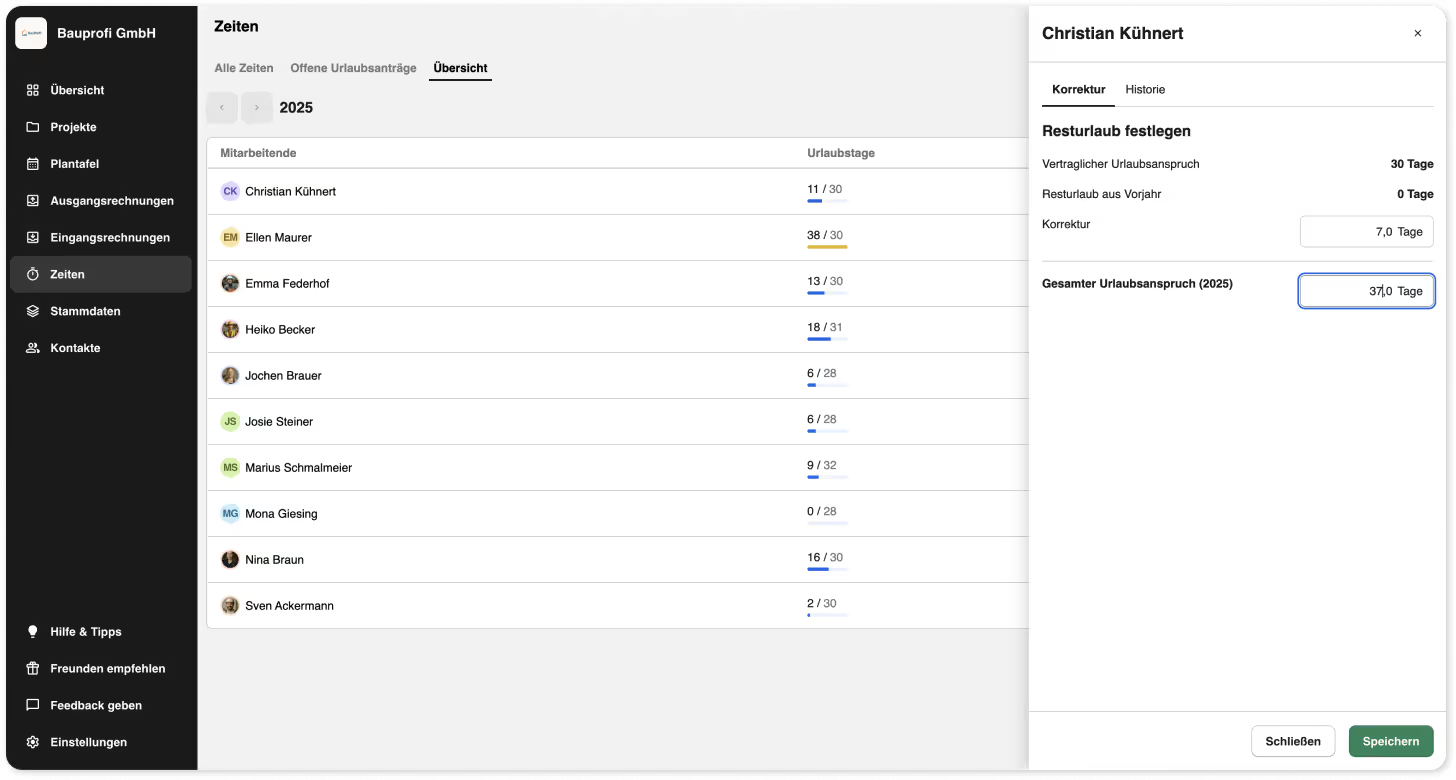
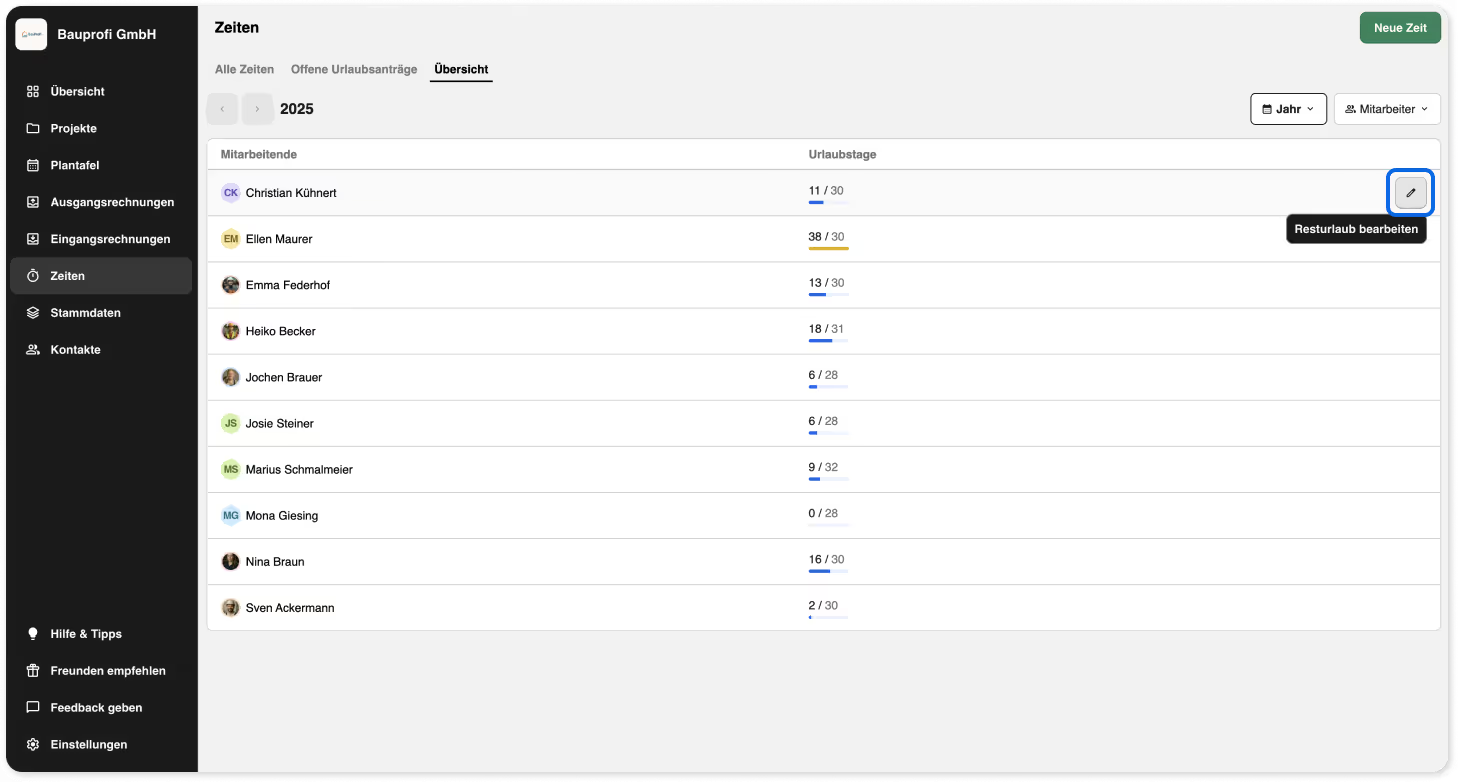
You can now view your employees' vacation accounts under “Time Tracking” in the new “Overview” tab. There, you can see directly in the employee list how many vacation days have already been recorded against their vacation entitlement in plancraft. In addition to the annual view, you can also display taken vacation days by month or filter by specific employees ..

Set vacation entitlement

As an admin, you can set the contractual vacation entitlement for each of your employees in the employee settings. This ensures that vacation entitlement is automatically calculated for time periods and can be viewed in the new "Overview" tab.

‍

Set remaining vacation

Using the Edit button, you can easily adjust the total vacation entitlement in the overview. You can either change the total entitlement or simply add or subtract individual days. After saving, the updated value is displayed directly in the list. If employees joined your company during the year, you can adjust their vacation entitlement in the same way.

Note: We ensure that remaining vacation from 2025 is automatically carried over to 2026.
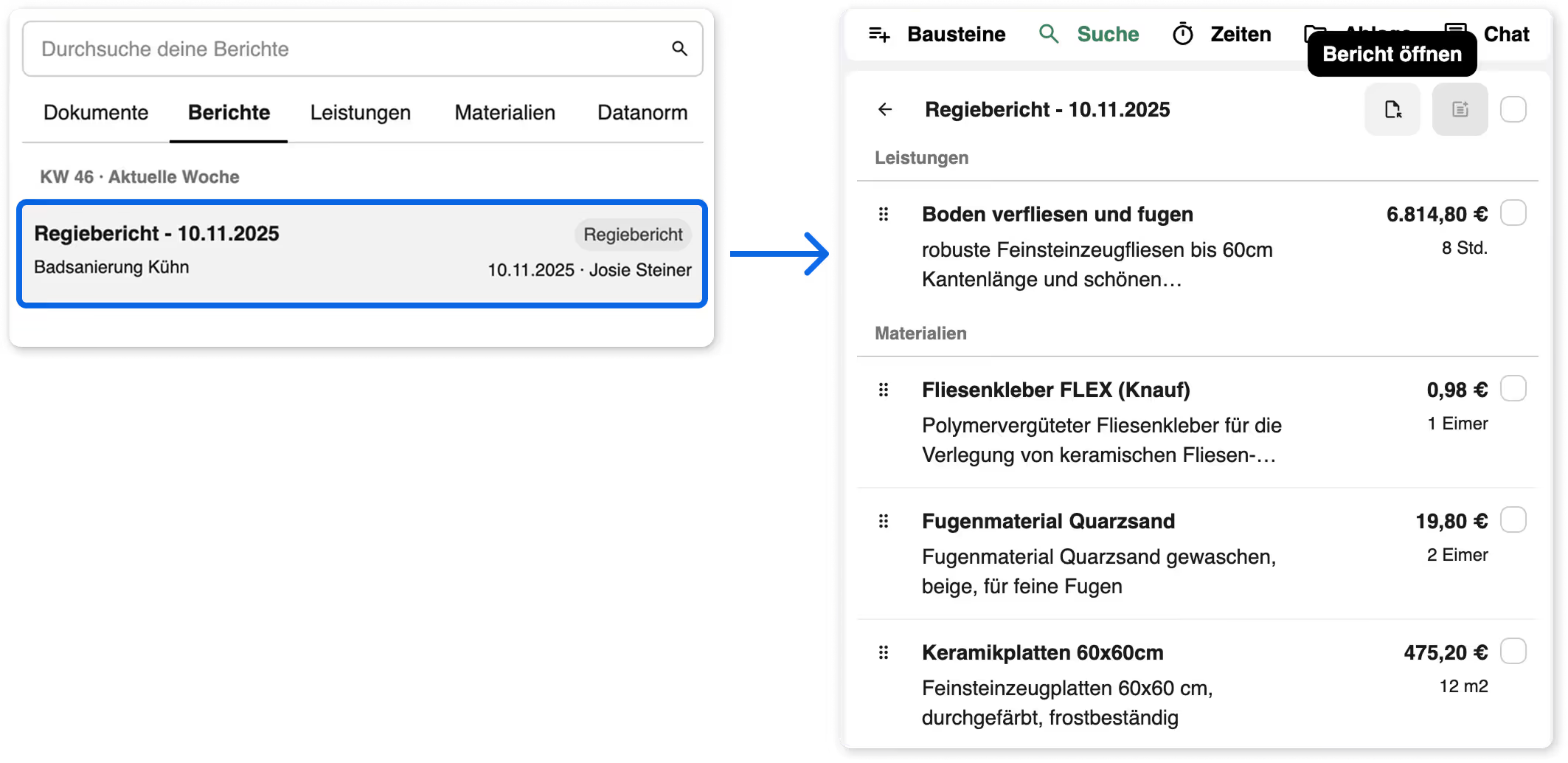
3. Open reports directly in the document and add content to your calculations 📋

Open reports from your projects directly in the document editor and instantly pull content such as employee, material, and service tables into your documents. You can also view the report as a PDF preview if desired.
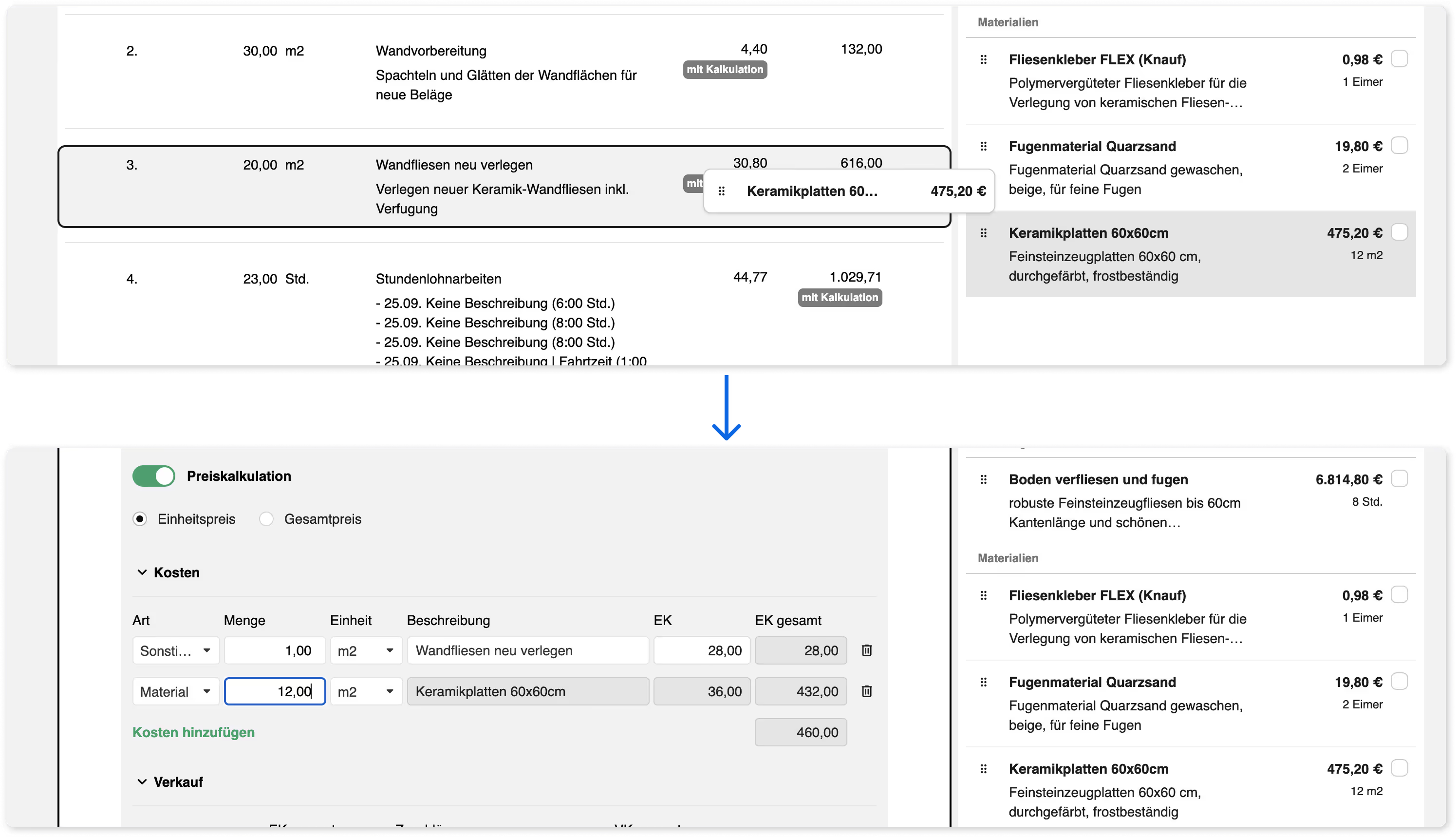
You can drag material and labor entries directly onto an item to add them to your price calculation – this also works with materials from the material or Datanorm search.
4. New role and access rights overview 🔐

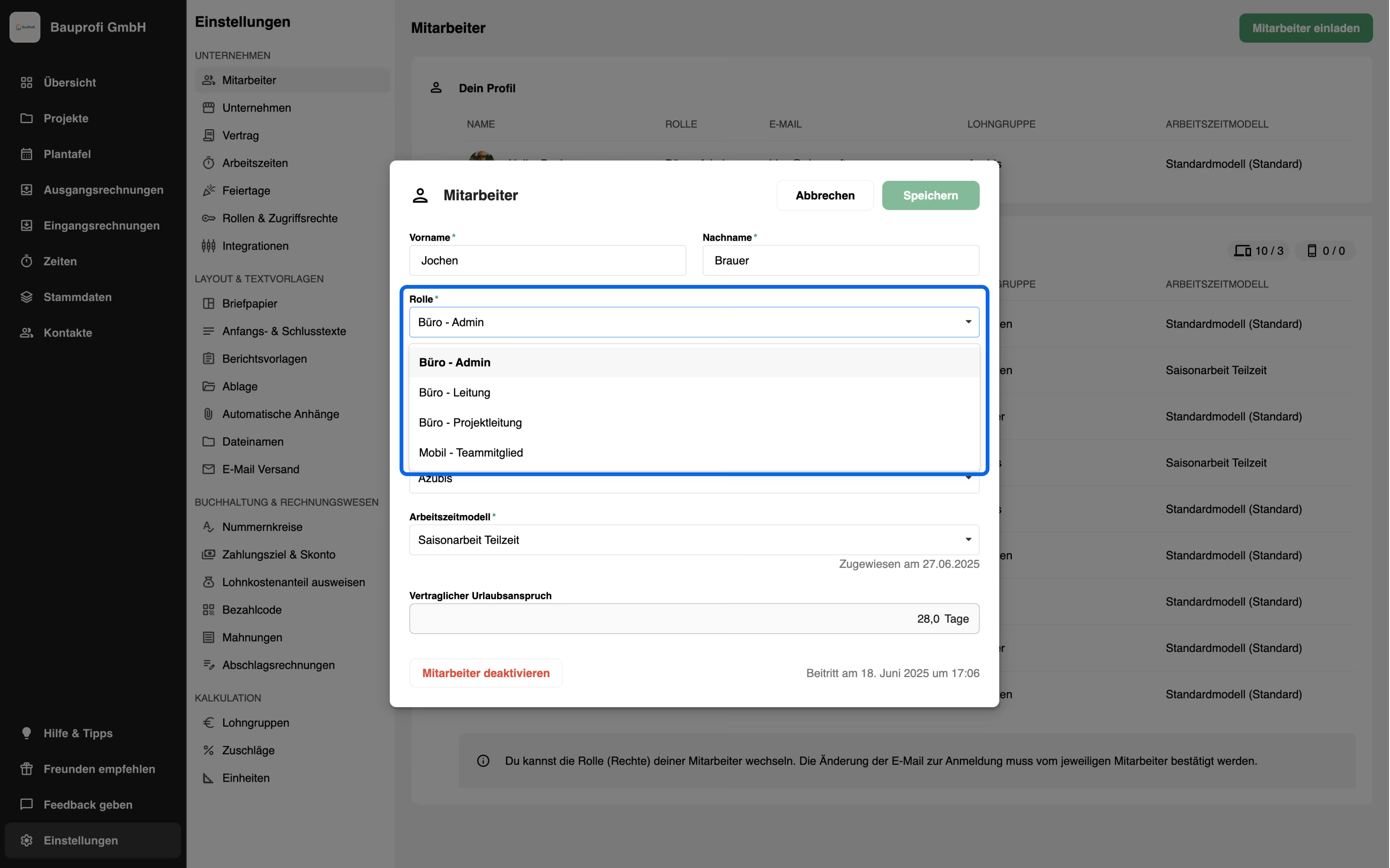
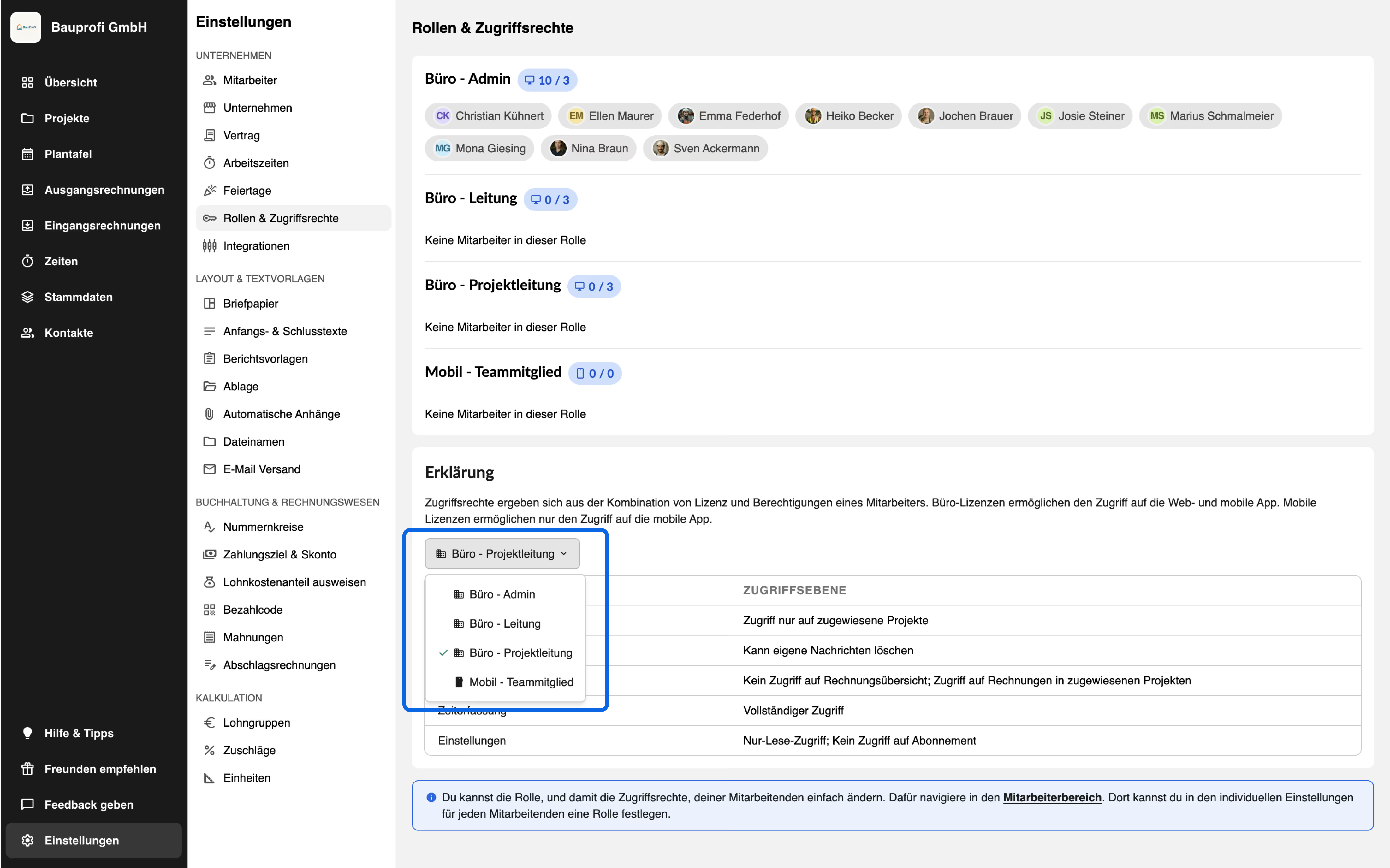
At the beginning of October, we introduced a new role called “Office - Project Management” . With this role setting, office staff can:

  • only access assigned projects
  • not access the invoice overview
  • only delete their own messages in the project chat
  • log time for themselves and others
  • have read-only access to settings

The role can be assigned to employees via the employee section in the settings.
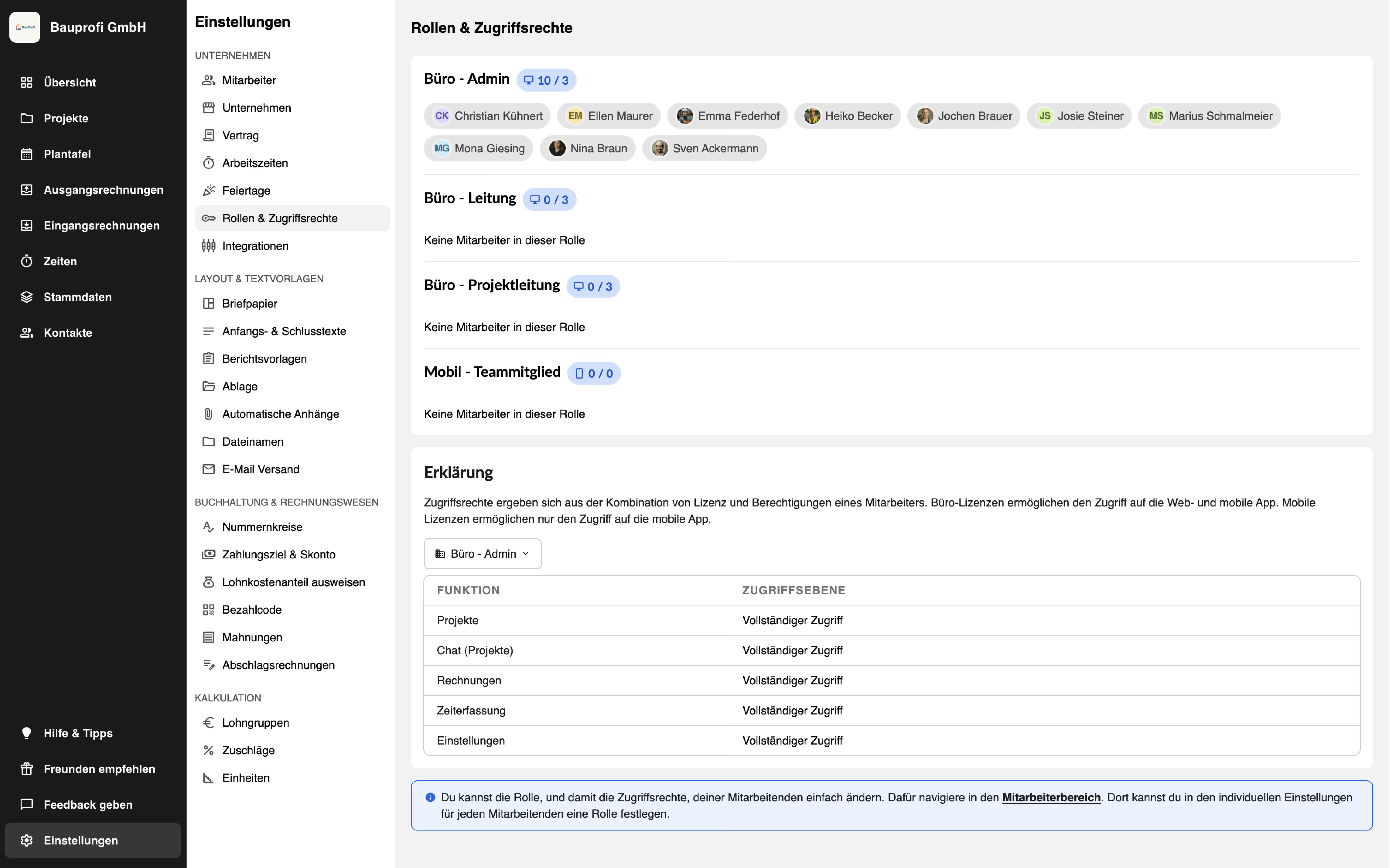
On the new overview page “Roles & Permissions” in the settings, you can see who holds which role. The various roles and permissions are also explained there.
5. GAEB export with all common formats 💾

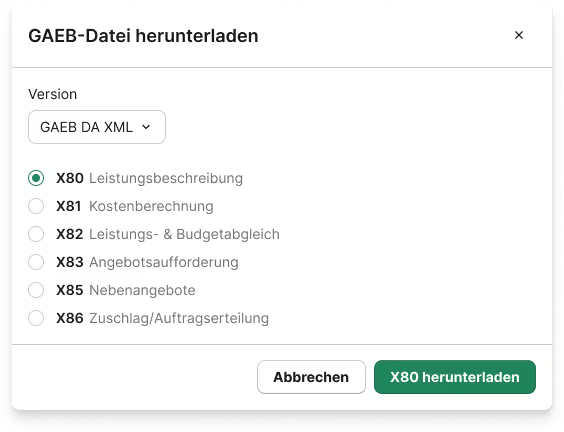
You can now download your quote documents in all common GAEB formats and versions. As usual, you can find the GAEB export in the download menu.

New: When downloading, a selection window now opens where you can easily choose the version and format yourself – ensuring you get exactly the file you need.
Improvements in the mobile app 📱

1. Vacation account

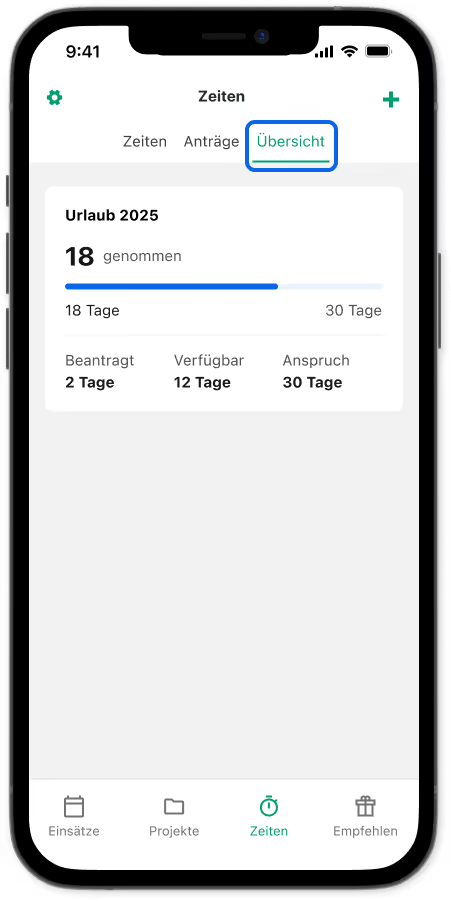
Mobile users can now also view their current vacation balance directly in the app. Under “Overview” in the Time section, they can see how many vacation days they are entitled to, how many they have already taken, how many are still remaining, and which ones are still awaiting approval by the admin.

This creates more transparency and helps everyone keep track of their vacation balance.
‍

Logo Handwerkersoftware plancraft
Less Office. More Craft.
+49 40 32 89 02 43 0

Mo - Fr 9am to 6pm

Facebook LoogInstagram LogoLinkedIn LogoYoutube LogoIcon von TikTok
Learn more
PricingProduct updatesCorporate PartnersCreatorPartner BusinessesFor master studentsFor business founders
Comparison
Plancraft vs. Traditional SoftwarePlancraft vs. Word/ExcelPlancraft vs. HERO softwareSwitching Bonus
Company
About usCareersEventswebinarPressNewsletters
Support & Help
Book a DemoFAQHelp CenterContact

Made with 💚 in 🇩🇪

English
German
English
German (Austria)
Dutch (Netherlands)
Italian (Italy)
Spanish (Spain)
© Plancraft 2026
ImprintPrivacy PolicyTerms & Conditions

The right language for you

We've recognized that you're accessing our site from another country. Would you like to use plancraft in another language?

English
German
English
German (Austria)
Dutch (Netherlands)
Italian (Italy)
Spanish (Spain)
Close and don't show again